
How to Optimize Container Iteration Speed
5 Ways to Faster Build, Push, Run Cycles for machine learning workloads
The container development cycle—build, push, run—is the foundation of modern application deployment, but it’s often a major bottleneck in the development process. A typical cycle takes 5-15 minutes and when multiplied across dozens of daily iterations, that’s hours of lost productivity. This guide covers 5 proven strategies with step-by-step guides to speed up container iteration times from basic Dockerfile optimizations to bleeding edge streaming approaches.
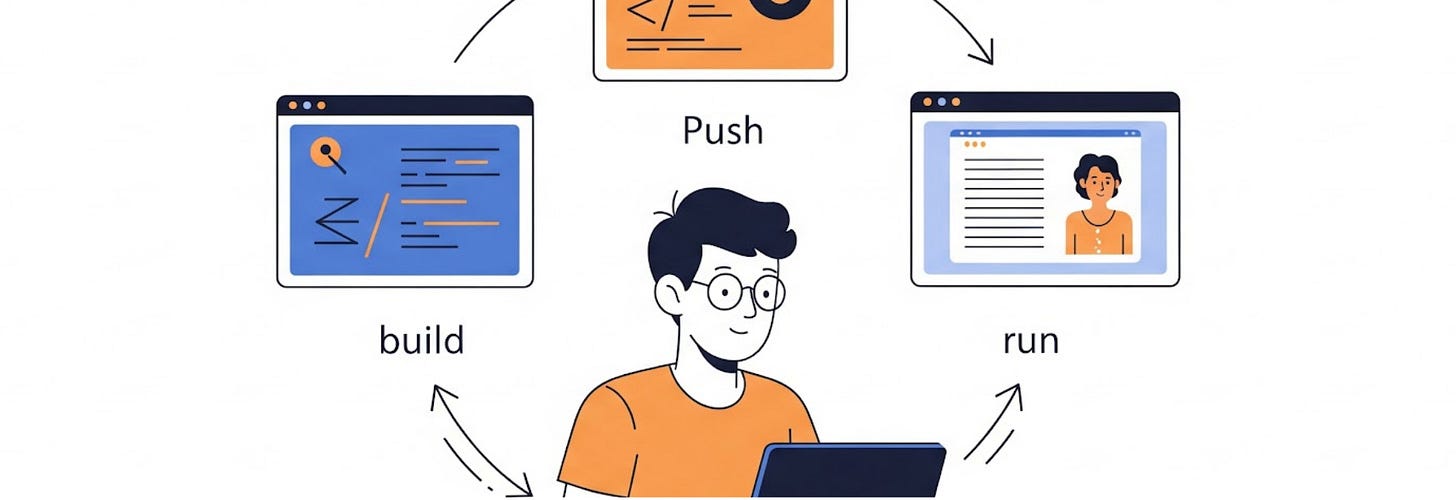
The Container Iteration Problem
Before we get started, let’s understand why traditional container workflows are slow. Modern containerized applications suffer from several key inefficiencies:
- Layer cache misses force full rebuilds when small changes occur
- Large image sizes slow push/pull operations across networks
- Cold starts require downloading entire images before execution begins
Each of these factors compounds the others, creating a multiplicative effect on total iteration time. The good news is that addressing these bottlenecks systematically can reduce iteration cycles from minutes to seconds and improve developer productivity.
Strategy 1: Optimize Container Build Speed
Docker Image Layers Caching
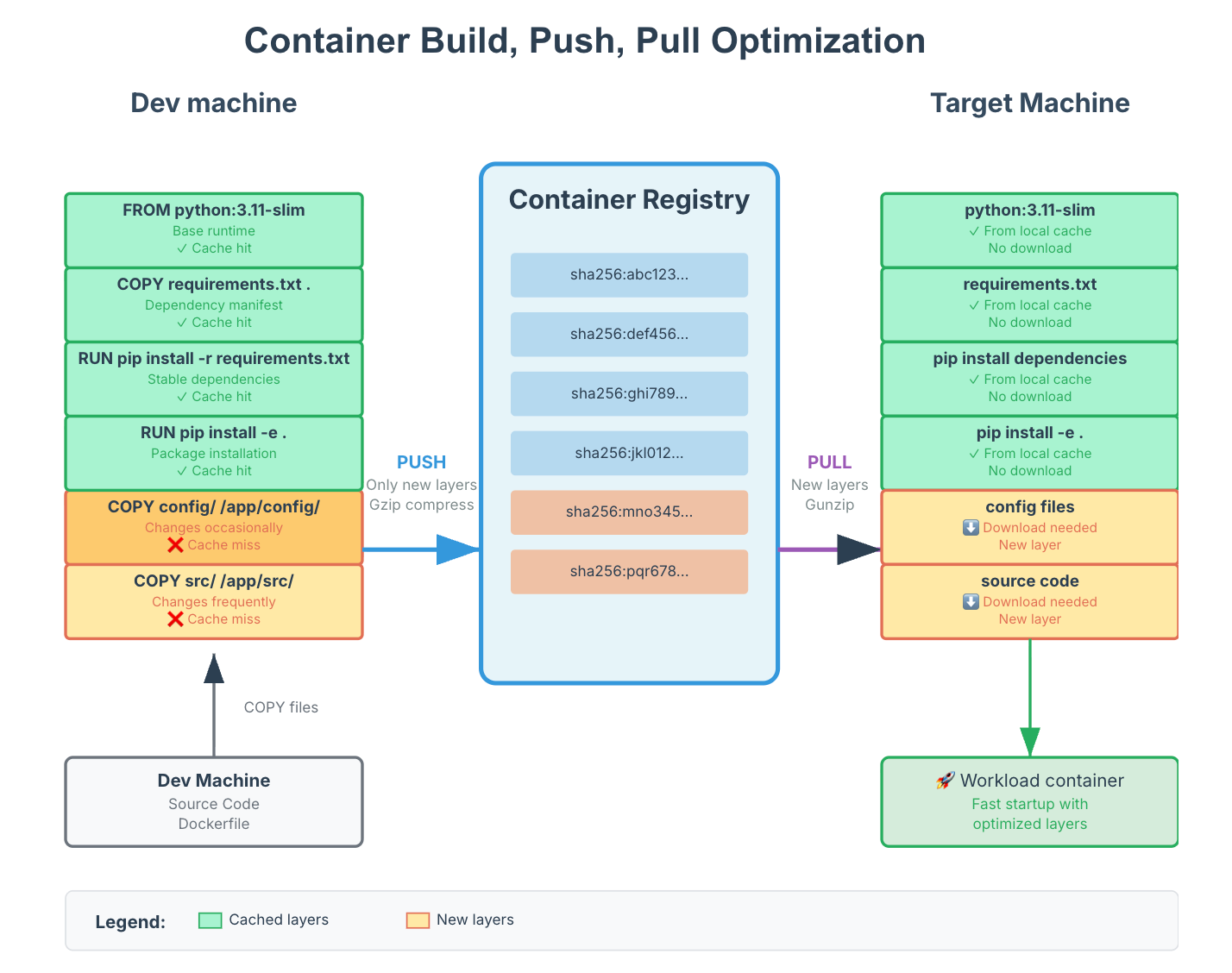
The Docker build cache operates on a layer-by-layer basis—when any layer changes from previous builds, all subsequent layers must be rebuilt and uploaded. This means the order of operations in your Dockerfile directly impacts build performance. On the target machine side, any layers from previously cached images will reduce the data to be fetched from the container registry.
Layer Ordering Strategy
The key insight is to structure your Dockerfile so that frequently changing components appear as late as possible in the build process. Here’s an example of before and after:
Before (Cache-Inefficient):
FROM python:3.11-slim
COPY . /app # Invalidate cache with every code change
WORKDIR /app
RUN pip install -r requirements.txt
RUN pip install -e .
CMD [”python”, “main.py”]
After (Cache-Optimized):
FROM python:3.11-slim
WORKDIR /app
# Install system dependencies (rarely change)
RUN apt-get update && apt-get install -y build-essential \
    && rm -rf /var/lib/apt/lists/*
# Install large packages separately (change occasionally)
RUN pip install --no-cache-dir torch torchvision
...
# Install other Python dependencies (change moderately)
COPY requirements.txt .
RUN pip install --no-cache-dir -r requirements.txt
# Set up package configuration (Depends on above)
COPY setup.py pyproject.toml ./
RUN pip install -e . --no-deps
# Copy source code (changes frequently)
COPY src/ ./src/
COPY main.py .
CMD [”python”, “main.py”]
This can reduce build times by 60-80% when only source code changes as the expensive dependency installation steps are cached.
Development Iteration Strategy
During active development, consider appending changes to your Dockerfile rather than modifying existing layers. This preserves the entire build cache:
# ... existing optimized layers ...
# Development iterations - append new changes
RUN pip install new-package==1.2.3
COPY new-module/ ./new-module/
ENV NEW_CONFIG_VAR=value
Remember to consolidate these changes back into a clean Dockerfile structure for production use.
Strategy 2: Container Image Size Optimization
Aggressive Cleanup in Single RUN Commands
Combine installation and cleanup operations in single RUN commands to prevent intermediate layers from inflating image size:
RUN apt-get update && apt-get install -y \
    build-essential \
    python3-dev \
    && pip install -r requirements.txt \
    && apt-get remove -y build-essential python3-dev \
    && apt-get autoremove -y \
    && rm -rf /var/lib/apt/lists/* \
    && pip cache purge
Remove Unused Dependencies
Requirements files often accumulate unused packages over time, and unused deps may not get removed promptly. Besides manually checking for unused packages, you can use tools like deptry, pip-autoremove to automate the process. deptry analyzes your project’s imports and dependencies to identify:
- Unused dependencies: Packages listed in your requirements.txt (or similar) that are not imported in your code.
- Missing dependencies: Packages imported in your code that are not listed as dependencies.
When using such tools, always remember to:
- Run tests thoroughly: Automated tools are a great starting point, but they can’t always catch dynamic or conditional imports.
- Review suggestions carefully: Understand why a tool suggests removing a package before you act on it.
- Consider your project’s specific needs: Some packages might be used for development, testing, or specific environments, even if not directly imported in your main application logic.
Multi-Stage Build Optimization
For applications with build dependencies, use multi-stage builds to separate build-time and runtime requirements:
# Build stage
FROM python:3.11 AS builder
WORKDIR /app
COPY requirements-dev.txt .
RUN pip install -r requirements-dev.txt
COPY . .
RUN python -m build

# Runtime stage
FROM python:3.11-slim
WORKDIR /app
COPY --from=builder /app/dist/*.whl .
RUN pip install *.whl
CMD [”python”, “-m”, “myapp”]
This approach can reduce final image sizes by 40-60% while maintaining fast builds.
Eliminate Unnecessary Files
After building a container, carefully inspect its contents to determine if all files are essential for the workload. A simple method for exclusion is to add these files to a .dockerignore file. An example of such a file might look like this:
.git
.github
*.md
.pytest_cache
__pycache__
*.pyc
node_modules/
.vscode/
tests/
docs/
Strategic Base Image Selection
Choose minimal base images appropriate for your runtime needs:
- python:3.11-slim (150MB) vs python:3.11 (1.12GB)
- node:18-alpine (110MB) vs node:18 (950MB)
- scratch or distroless for static binaries
The size difference alone can reduce push/pull times by 5-10x.
Strategy 3: Optimize Target Machine Performance
Tune Boot Disk Performance
Most cloud providers allocate disk I/O bandwidth (IOPS & throughput) based on disk type and size. This often becomes a hidden bottleneck during image pulls.
For example, if your compressed image is 3GiB (expanding to 5GiB), you need to write 8GiB total during fetch. On Google Cloud Platform, a 100GiB PD-balanced disk provides maximum throughput of 0.28MiBps/GiB × 100GiB = 28MiBps. This limitation alone requires nearly 5 minutes to download the image from scratch. Upgrade to faster disk like PD-SSD or larger disk sizes may be helpful.
Enable Image Streaming (GKE)
Google Kubernetes Engine and Azure Container Instances offer image streaming features that allow containers to start before the entire image downloads, reducing cold start times by 50-80%.
Benefits:
- Dramatically faster startup times
- One-time configuration change
- Particularly effective for large images with unused dependencies
- Compatible with most existing workloads
Limitations:
- Limited platform support (Google Cloud, Azure as of 2026)
- Doesn’t reduce build/push times
- Slight runtime overhead for streamed layers
Learn more: https://cloud.google.com/kubernetes-engine/docs/how-to/image-streaming
Strategy 4: Deferred Installation
How Tools Like Ray and SkyPilot Implement This
Popular frameworks like Ray and SkyPilot utilize this pattern by default. Here’s a minimal SkyPilot configuration:
name: ml-training
resources:
  accelerators: V100:1
workdir: .
setup: |
  pip install -r requirements.txt
run: |
  python main.py
In this model, the workspace directory syncs to the remote workspace, then pip install -r requirements.txt runs after the pod starts, rather than during image build.

Trade-offs Analysis
Benefits:
- Eliminates container build/push cycles for most iterations
- Faster initial pod startup
- Flexible per-experiment dependency management
Considerations:
- Slower time-to-ready for applications (setup occurs post-startup, typically slower than pulling from artifact registry)
- May not fit certain production deployment
- Complex integration with custom build processes or private registries
- Risk of dependency version drift between iterations
- Network costs for dependency downloads (especially with NAT gateways)
- Setup runs on potentially expensive machines (e.g. GPU instances)
Strategy 5: Development Container Streaming
Looking at our optimization diagram, you'll probably see that development environments typically contain all the dependencies but don't contribute to the container cycle. What if we can use that instead?
Some internal platforms at large companies use special build processes (e.g. Bazel), or shared-volume systems to achieve the same effect.
Velda is one solution that eliminates this inefficiency by making the dev environment itself the deployment target.
How it works: Velda provisions development containers with data stored on shared storage servers in your cluster. When launching a workload, it mounts the same volume as the original container, so the environment is perfectly matching.

Pros and Cons
Pros:
- Almost zero iteration time (jobs start in seconds)
- Guaranteed Dev/Prod environment parity
- No separate manifest / dockerfile required
- No container registry bottleneck
- Works best for internal-facing workloads, e.g. AI/ML research, evaluations, batch jobs.
Cons:
- Additional packages used for development may increase attack surface, may not fit public facing services
- All development must occur within Velda managed containers
- Network latency may impact performance
For other workloads, it can still enhance existing development workflows, offering additional scalability during iteration while preserving traditional deployment methods for production releases. Get started with open source.
Conclusion
Container iteration speed optimization requires a systematic approach, addressing bottlenecks from dev to deploy. The strategies outlined here can reduce total iteration time from 10-15 minutes to under 30 seconds in the best cases.
Start with low-complexity, high-impact optimizations like cache ordering and size reduction. Then gradually implement more sophisticated approaches based on your team’s specific needs and infrastructure capabilities.
Remember: it’s not just faster containers, it’s faster development cycles that enable more experimentation and innovation. The future of container development is treating containers as dynamic, streaming entities rather than static artifacts, getting us closer to the immediate feedback loops that make development efficient.
By doing this systematically, dev teams can turn container iteration from a productivity bottleneck into a competitive advantage, and get to market faster with containerized applications.